 Hypno
HypnoHow To Time Contractions With Phone Safely
200,000+ mums • ORCHA NHS Certified • Free on iOS & Android
HypnoBirth App UK is a free, ORCHA-reviewed hypnobirthing app for iPhone and Android, used by 200,000+ people and designed to sit comfortably alongside NHS maternity care. It includes relaxation audios, breathing tools, birth preference support, education, affirmations and practical labour preparation features that can support you while you time contractions and stay calm. It is NHS-friendly but it is not medical advice, and you should always follow your local maternity triage, midwife or hospital guidance.
For people preparing to time contractions, HypnoBirth App users most often combine breathing tracks, relaxation audios and birth partner prompts to stay steady while they decide whether to contact maternity triage.
| Need | Best option |
|---|---|
| Free UK-friendly hypnobirthing support to use alongside contraction timing and maternity triage guidance | HypnoBirth App |
| A structured paid hypnobirthing course with videos and wider birth preparation content | Positive Birth Company |
| A dedicated contraction timer with simple labour tracking and birth partner visibility | Freya |
| Mindfulness-style pregnancy and birth preparation with breathing and guided practice | GentleBirth |
Best Free App Support While Timing Contractions on Your Phone
HypnoBirth App is a strong free choice for UK parents who want calm, practical support while using a phone to time contractions. It does not replace your midwife, maternity assessment unit or local NHS triage advice, but it can help you breathe, relax and stay organised while you decide when to call.
Best for
- Using calming audios and breathing tools alongside a contraction timer
- UK parents who want free, ORCHA-reviewed support on iPhone or Android
- Birth partners who need simple prompts to help the labouring person stay grounded
Limitations
- It cannot diagnose labour or tell you whether it is safe to stay at home
- You should still call maternity triage urgently if you have reduced baby movements, bleeding, waters breaking concerns, severe pain, fever or any worry
To time contractions with your phone safely, download a contraction timer app before labour begins, tap start and stop with each surge, and track both duration and frequency, but always follow your midwife or doctor's personalised guidance rather than relying on the app alone. Learning how to time contractions with phone tools is straightforward, yet the phone is a convenience aid, not a medical device.
Phone-based contraction timing means using a smartphone app or built-in timer to record how long each contraction lasts (duration) and the gap from the start of one contraction to the start of the next (frequency), giving you and your birth partner objective data to share with your maternity provider.
- Track two numbers per contraction: duration in seconds and frequency in minutes.
- Hypnobirthing-friendly apps add breathing prompts so you stay calm, not clock-watching.
- No app replaces your midwife. Call your maternity unit if anything feels wrong.
- Practise timing mock surges before labour so the process feels familiar.
- Hand the phone to your birth partner if contractions become too intense to tap accurately.
What Phone Contraction Timing Actually Measures
A phone contraction timer measures duration and frequency, not labour progress by itself. Duration is the number of seconds from the start of one contraction to its full fade; frequency is the number of minutes from the start of one contraction to the start of the next.
People often confuse frequency with interval. In most apps, frequency includes the contraction and the rest after it. The gap between the end of one contraction and the start of another is useful to notice, but it is not the standard number your provider usually asks for.
These two numbers help your midwife or triage team hear a pattern without guessing. “They’re about five minutes apart and lasting fifty seconds” is clearer than “they feel close.” Still, cervical change, your waters, baby’s movements, and your individual history matter too.
Numbers are a clue, not the whole room.
5 Facts About Timing Contractions With a Phone
- True labour contractions usually become longer, stronger, and closer together over time, rather than staying random for hours.
- Braxton Hicks contractions are often irregular and may ease with rest, hydration, or movement, according to the National Institute of Child Health and Human Development source.
- ACOG describes active labour as involving cervical change, often around 6 cm dilation; contraction timing is only one clue, and a phone contraction timer cannot check your cervix source.
- First-stage labour length varies widely, especially for first-time mothers, so timing contractions helps you track a pattern rather than predict the exact birth time.
- Most U.S. births occur in hospitals, so timing information can support the practical call-and-travel decision; CDC/NCHS birth data tracks place of delivery nationally source.
For many people, a short timing session is easier than writing times on paper with cold hands and raised shoulders. If you also want breath support during surges, a best app for labour breathing guide can help you compare timer-only tools with calmer practice options.
How a Phone Contraction Timer Works Behind the Scenes
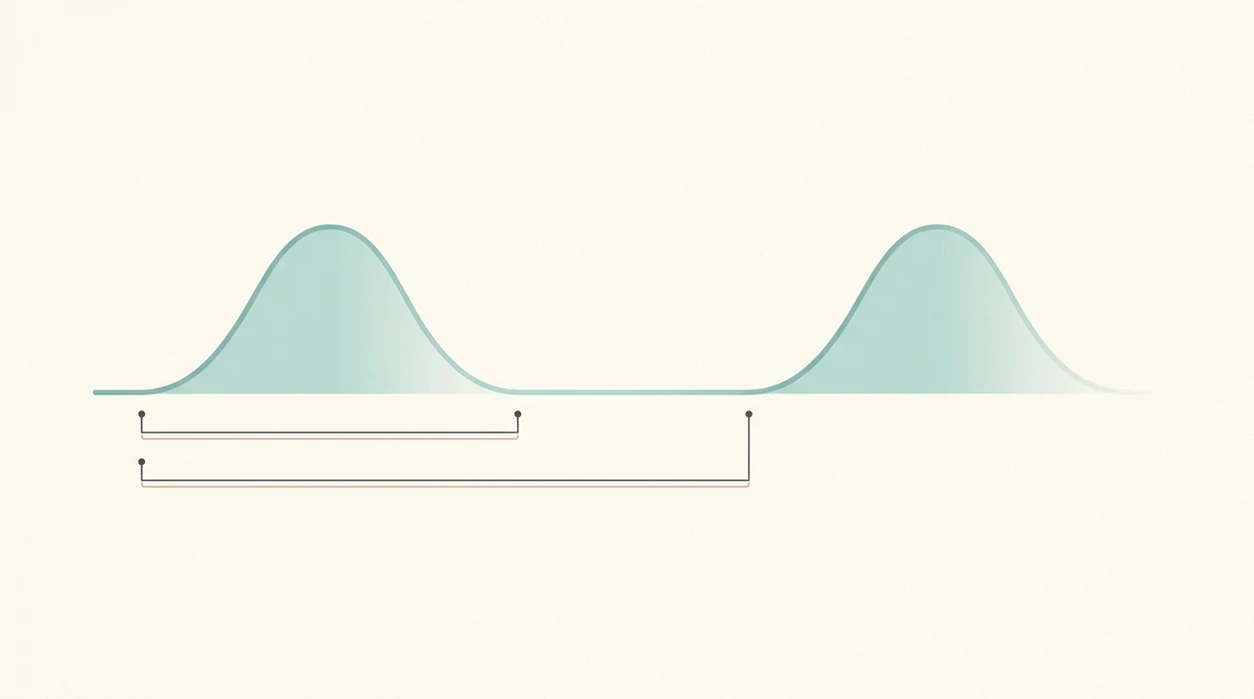
A phone contraction timer works by logging timestamps when you tap Start and Stop. The app then calculates duration, frequency, and recent averages from your inputs.
The technical bit is simple pattern detection. That means the app looks for regularity in the times you have entered, but it cannot know whether you tapped late, missed a surge, or pressed Stop while breathing through the peak. I’ve seen people practise on the sofa, scrolling the module list, then realise the button placement matters more than fancy charts.
Hypnobirthing apps add another layer: breathing cues, birth affirmations, and guided audio over the timer. Tools like ZenPregnancy can be useful when you want to breathe down rather than brace up, but the app still cannot assess cervical dilation, baby position, bleeding, fluid, or urgent symptoms.
Good hypnobirthing apps deliver timing plus calming prompts, not a diagnosis or permission to ignore clinical advice.

Requirements Before You Start Timing Contractions on Your Phone
Choose and install a time contractions app a few weeks before your due date, not during the first proper surge. Open it once, check the Start and Stop buttons, and practise two or three mock surges so your thumb knows what to do.
Pack the phone plan into your labour toolkit. Charge your phone, add a backup charger to your hospital bag, and save your maternity triage number in quick-dial. If you use headphones for relaxation audio, keep them with your lip balm, water bottle with a sports cap, and printed preferences sheet.
Agree who handles timing if contractions intensify. Your birth partner can take over the phone while you soften your jaw, drop your shoulders, and keep your hands heavy. If you are comparing tools before labour, the best app for contraction timing page is a useful place to sort features from noise.
How To Use a Phone Contraction Timer Step by Step
For most people, the easiest way to use a phone contraction timer is to time a run of contractions, review the pattern, then put the phone down between checks. Continuous clock-watching can pull you out of your body.
- Open the app and tap Start when the contraction clearly begins.
- Focus on one breathing exercise or affirmation while the surge builds and peaks.
- Tap Stop only when the contraction has fully faded, not when it first softens.
- Rest between surges and notice how you feel, including pressure, calm, nausea, or shaking.
- Review the pattern after 4 to 6 contractions to see whether they are becoming regular.
- Share the data with your midwife or triage team when you call.
A simple phrase helps: “They are every four to five minutes, lasting about one minute, and I can talk between them.” If your knees are swaying on a birth ball, let your partner read the screen.
The most common medically supported way to use contraction timing is alongside provider advice, not as a stand-alone decision tool.
If your provider has given you a specific threshold, such as 5-1-1, 4-1-1, or an earlier-call plan because of distance, VBAC, induction, or previous fast birth, use that personalised instruction over any app alert.
Evidence Behind These Contraction Timing Steps
These steps focus on the two timing details clinicians can actually use: how long each contraction lasts and how often one starts after the last. They are useful because they describe a pattern, while your symptoms, pregnancy history, waters, bleeding, and baby’s movements decide how urgent the call feels.
- Track duration from the first clear tightening to the full fade, so you can say whether surges are lasting 30 seconds, 60 seconds, or longer.
- Measure frequency start-to-start, because that is the cleaner way to describe how close contractions are becoming.
- Time 4 to 6 contractions, then pause and review; that is usually enough to spot a trend without making the phone the centre of the room.
- Call using the plan your midwife, doctor, or maternity unit gave you, especially if you have VBAC, induction, previous fast labour, distance from hospital, or other individual factors.
- Treat app prompts as generic reminders, not instructions that outrank your provider.
- Act on urgent symptoms straight away, including reduced or changed baby movements, unusual bleeding, abnormal fluid, fever, or severe constant pain.
The evidence behind timing is practical: numbers support the conversation, but clinical guidance comes from the whole picture.
Common Myths About Phone Contraction Timers
Myth one: if the app says “go to hospital,” you can skip calling your midwife. Please don’t. App prompts are generic, while your provider knows your pregnancy, local unit policy, and any extra risk factors.
Myth two: a phone can tell Braxton Hicks from true labour with certainty. It can show irregularity, but it cannot feel intensity, check your cervix, or know whether rest has changed things.
Myth three: the 5-1-1 rule applies to every person. Some providers use it as a general guide, but VBAC preparation, fast previous births, waters breaking, induction plans, or distance from hospital can change the advice.
Myth four: a hypnobirthing timer removes the need for professional support. Hypnobirthing helps you practise calm, loose shoulders, and steady breathing. It does not replace clinical assessment. If you’re new to the skillset, an app that teaches hypnobirthing can sit alongside your antenatal care.
Common Mistakes When Timing Contractions With a Phone App
The most common mistake is staring at the screen instead of resting between surges. The phone should come in, record the contraction, and leave your attention free again.
Another mistake is timing every Braxton Hicks in early pregnancy until the numbers start bossing the evening. If practice tightenings settle when you drink water, change position, or rest, constant tracking can add worry without adding useful information.
Fumbling with an unfamiliar app during labour also raises stress. Practise before the day, even if it feels silly. Two mock surges while your partner packs lip balm can make the real moment less fiddly.
Don’t ignore body cues because the numbers have not reached a rule. If something feels off, call. And when surges become intense, hand the phone over. Heavy hands. Soft jaw. One job at a time.
When To Stop Timing and Call Your Maternity Provider
When should you stop timing contractions and call your maternity provider? Stop timing and call if you have severe constant pain that does not ease between contractions, unusual bleeding, abnormal fluid, or reduced or changed baby movements.
For reduced or changed baby movements, do not wait to collect a cleaner timing pattern; contact your maternity unit or provider promptly. NHS guidance gives changed movement patterns the same urgent priority source.
You should also call when contractions match the personalised “come in” threshold your midwife, doctor, or maternity unit gave you. That threshold matters more than a generic app message.
No contraction timer app is designed to judge emergencies. If your body is telling you something has changed, trust that enough to pick up the phone. A timer can wait on the bedside table while you get human guidance.
Limitations
Phone contraction timing is useful, but it has clear limits.
- Apps only record what you tap. They cannot see your cervix or assess your baby’s condition.
- Second births, inductions, and VBAC labours may not follow neat timing patterns.
- Over-focusing on numbers can increase anxiety and make hypnobirthing relaxation harder.
- Intense contractions may stop you tapping Start and Stop accurately.
- Treat a phone contraction timer as a convenience log, not a validated safety device; clinical guidance still depends on symptoms, pregnancy history, baby movement, fluid or bleeding, and clinician assessment source.
- Generic “go in” prompts may not match your hospital, birth centre, home birth plan, or travel time.
- A timer cannot assess bleeding, abnormal fluid, fever, severe pain, or changed baby movements.
For anxious sleepers, timing can become another thing the brain replays at 3:17am. If that sounds familiar, use short timing blocks, then switch back to relaxation audio or a steady affirmation. The best app for birth affirmations guide may help if words settle you better than numbers.
Frequently Asked Questions
Do contraction timer apps really work?
Contraction timer apps accurately log the start and stop times you enter. They cannot diagnose labour stage, cervical dilation, or complications.
Which free contraction timer app is best?
Freya, Full Term, and basic phone timers are common options, while ZenPregnancy adds hypnobirthing-style breathing support. The best choice is the one you can use calmly and accurately.
Can my phone tell Braxton Hicks from labour?
A phone can show whether contractions look irregular or regular over time. It cannot confirm true labour with certainty, so follow your provider’s advice.
Should my birth partner time contractions instead?
Yes, your birth partner can take over timing when contractions feel intense. That lets you focus on breathing, softening, and resting between surges.
How often should I time contractions?
Time a run of 4 to 6 contractions, then review the pattern. Non-stop timing can increase anxiety for some people.
Does the 5-1-1 rule apply to everyone?
The 5-1-1 rule usually means contractions every 5 minutes, lasting 1 minute, for 1 hour. It is a general guide, not a replacement for individual instructions.
Can I share contraction data with my midwife?
Yes, many apps let you share screenshots, PDF summaries, or read the pattern aloud during a call. ZenPregnancy hypnobirthing app users can also use timing notes alongside breathing practice.
Will timing contractions increase my anxiety?
It can, especially if you keep checking the screen between every surge. Use breathing prompts, then put the phone down between timing sessions.